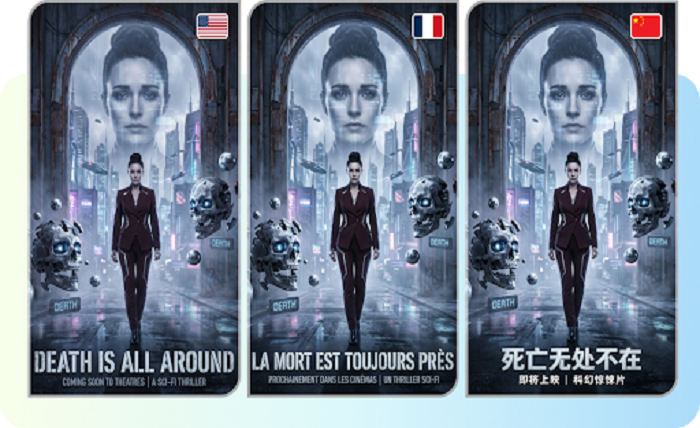
“Agent, the 8:15 is running four minutes late. Trust no one, especially the man with the oversized umbrella.” That’s how a spy thriller commute story begins, and it’s surprisingly easy to bring to life. With a talking photo of your own avatar and Pippit doing the heavy lifting, your daily trip turns into a mission briefing delivered in a gravelly, dramatic voice. No cameras, no cast, just a picture and a script. If your commute has ever felt like a stakeout, this one’s for you. Open Pippit, pick a portrait, and prepare for your first assignment.
Every bus stop hides a double agent
Commutes are weirdly perfect for thrillers. You already follow a fixed route, see the same faces, and carry a bag you’d rather nobody opened. All a story needs is a slight tilt of perspective. The barista becomes a handler. The delayed train becomes an exfiltration problem. Your avatar narrates all of this in a serious tone, which is where the humor lives: huge stakes, tiny problems. The more mundane the setting, the funnier the contrast, so don’t hunt for exotic locations. Your actual route is plenty.
Plot beats for a ten-minute mission
You don’t need a complicated script. Borrow a few beats and arrange them however you like:
- The briefing: your avatar explains today’s objective in a hushed voice.
- The tail: someone in a gray coat appears at every stop.
- The handoff: a suspicious coffee cup changes hands.
- The complication: a sudden platform change throws off the plan.
- The escape: you make it to the office with seconds to spare.
Atmosphere is half the thriller
A thriller without atmosphere is just somebody reading a script, and SeedAudio 1.5 closes that gap nicely.
Rain, footsteps, and a slow bassline
Describe the scene in plain words and you get ambience, footsteps, effects, and tense music generated together. Ask for a rainy platform with distant announcements and a low pulse, and one prompt covers it.
Sound that follows the picture
Feed it a video and it reads the visual beats, then scores the action so effects and mood land exactly when something happens on screen.
Layers you can rebalance
Each element arrives as its own track. If the music swallows the narration during the chase, pull it down and keep everything else untouched.
Cues placed to the second
Timestamps let you drop a door click or a musical sting at a precise moment, which is how suspense gets built.
Open the case file: three steps to your first episode
Ready? Here’s how the briefing becomes a video.
Step 1: Choose your agent’s face
Sign in to Pippit and go to the Video generator.
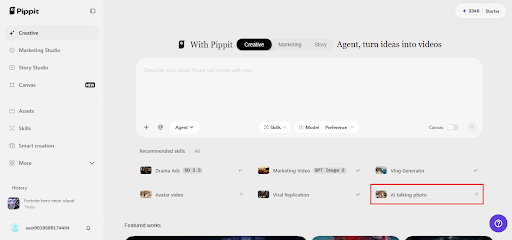
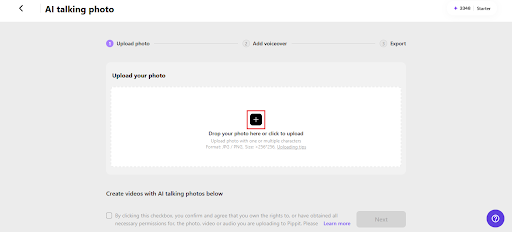
Select the AI option that makes a still image speak and upload your agent. Click the box or drag the file over, keeping it at least 256×256 pixels. Confirm you can legally use the image and click Next.
Step 2: Write the briefing
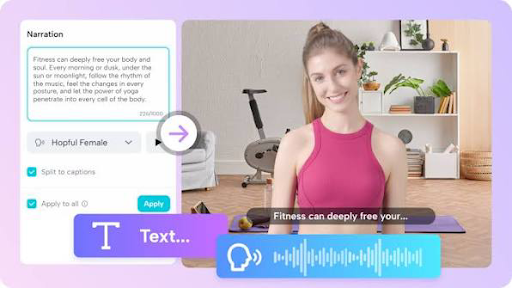
Pick Read out script and type your narration. Choose a language, listen through a few voices (a low, calm one suits the genre), and set a caption style if you want subtitles. Save it. Or switch to Upload audio clip to use your own recording or a trending clip.
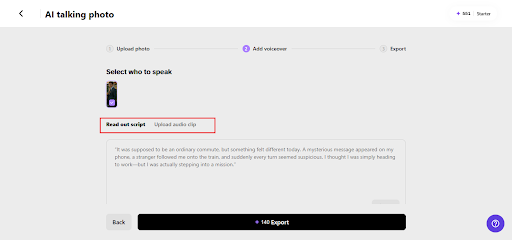
Step 3: Deliver the file
Press Export, give the video a code name, and set the watermark, resolution, quality, frame rate, and format as needed. Click Download and the mission file is yours.
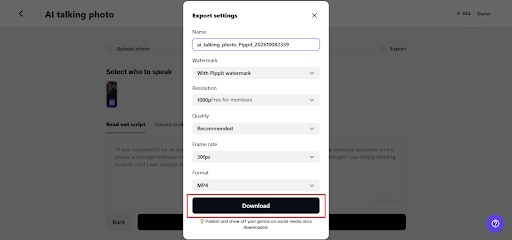
Narration tricks that build tension
Thrillers rely on restraint. Speak in short, clipped lines and let silence do some of the work. Drop details one at a time instead of explaining everything at once. Use present tense, because it makes the action feel live: “He’s crossing the platform now.” Add a small lie or doubt, like “I think he saw me.” And don’t be afraid of dry humor. A deadpan comment about the vending machine being compromised gives viewers permission to smile while the music stays serious.
Turning one commute into a whole series
Once you’ve told one story, the rest come easily. Give each day of the week its own case: Monday is a surveillance run, Wednesday is a double cross, Friday is the finale. Recurring characters help, like a rival agent who always sits in your seat. Keep each episode short, under a minute if possible, and end on a cliffhanger. Posting at the same time every day trains viewers to wait for the next installment. Keep notes on what happened so continuity doesn’t wobble.
Last-minute checks before you hit publish
Do a quick sweep before sharing. Watch for lines where the voice speeds up awkwardly, and add a comma or period to slow it. Make sure captions are readable over your background. Check that the portrait still reads well when the video is small, since most people will watch on a phone. And listen once with headphones, because mix problems hide on laptop speakers. If one line never sounds right, swap the words rather than fighting the pronunciation.
Building a recurring cast of suspicious strangers
Every good spy series needs faces viewers can learn to distrust. Invent a few commuters and give each one a quirk: the man with the newspaper he never reads, the woman who always checks her watch twice, the cyclist who nods a little too knowingly. Mention them across episodes so viewers start spotting patterns. You can even let your audience guess who the double agent is in the comments. This turns a simple narration into a small guessing game, and people who feel involved are far more likely to return for the next installment.
Mission accomplished, almost
Your commute already has the setting, the suspects, and the suspense. All it needs is a narrator with a voice for danger. Pippit turns a single portrait into that narrator without a camera or a studio in sight. Write the briefing, pick the voice, and let your agent report in. Open Pippit now and start your first assignment.